


Backup4all, your data bodyguard
What if you woke up one day to find that you lost precious photos of dear ones? How about losing your business documents, research and other important data?
Shivering thoughts, with a simple solution: Backup4all.
Backup4all is a powerful backup software used by NASA on the ISS that can be used to back-up your personal or business data into the cloud. Download it now and start protecting your data.
Backup4all application
The backup software that's used on the International Space StationAbout Backup4all
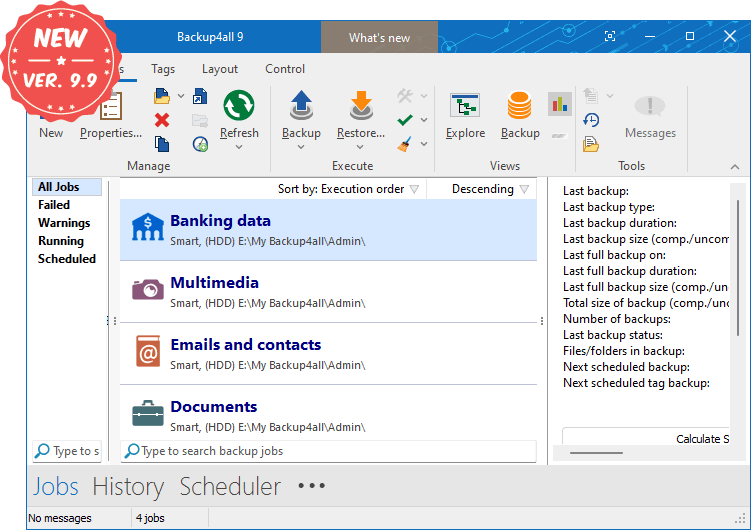
Backup4all is a feature-rich backup software that automatically protects your valuable data from total or partial loss. Its intuitive interface makes it easy to use for beginners, but also includes advanced features for power users. You can use it to backup from the cloud and backup to cloud or other sources/destinations.
Backup4all is compatible with the following operating systems: Windows 11, 10, 8, 7, Vista, Server 2022/2019/2016/2012/2008 (32/64-bits)
With Backup4all you can easily backup from/to multiple sources/destinations:- Local - back-up from/to local HDD or DVD, CD, Blu-ray
- External - back-up from/to external HDDs (USB/Firewire enclosures) or removable media (i.e. USB drives).
- Network - back-up from/to network locations
- Remote - back-up from/to FTP, FTPS and SFTP
- Cloud - back-up from/to online sources/destinations such as Google Drive & Cloud Storage, Microsoft OneDrive, Dropbox, Amazon S3, Azure, BOX, Hidrive and 37+ S3 Compatible cloud destinations.
Main features
Backup to/from the Cloud
Back-up your data in the cloud to Google Drive, Microsoft OneDrive, Dropbox, Amazon S3, Microsoft Azure, BOX, Hidrive and over 37 Amazon S3 Compatible cloud destinations (i.e. Backblaze, Cisco, Google Cloud Storage, Tiscali, Verizon).
Starting with version 9 you can use files and folders from cloud locations or FTP/SFTP servers as backup sources.
Starting with version 9 you can use files and folders from cloud locations or FTP/SFTP servers as backup sources.
Free Backup Plugins
You can load plugins for backing up or restoring specific programs' settings or other custom data (like game saves, email data, etc.). A plugin is actually an XML file that once imported in Backup4all adds a predefined backup.
249 free backup plugins are currently available. You can load these in Backup4all to back-up specific apps and data sets easier.
249 free backup plugins are currently available. You can load these in Backup4all to back-up specific apps and data sets easier.
True Incrementals
Backup4all can back-up using an incremental backup type. Incremental backup provides a faster method of backing up data than running full backups.
During an incremental backup, only files changed since the most recent backup are included. Its advantage is that it takes the least time to complete.
During an incremental backup, only files changed since the most recent backup are included. Its advantage is that it takes the least time to complete.
Backup4all Monitor
Remote monitoring for your backups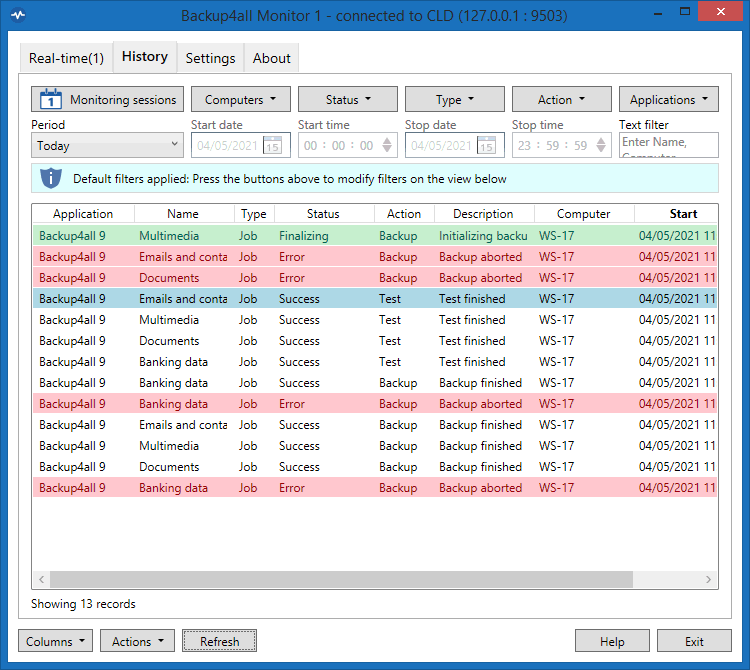
Backup4all Monitor provides realtime and historical monitoring for actions executed by Backup4all on remote machines. You can monitor remotely backup/test/restore & cleanup job actions from any client computer that has Backup4all installed.
Backup4all Monitor is compatible with the following operating systems: Windows 11, 10, 8, 7, Vista, Server 2022/2019/2016/2012/2008 (32/64-bits)
The Backup4all Monitor has two components:-
Backup4all Monitor Server. The server gathers the monitoring information sent to it from all the client computers that have Backup4all installed and configured to send data. The server can be installed in your own network or on cloud servers such as Amazon S3/Azure.
-
Backup4all Monitor Dashboard. The dashboard provides a graphical user interface for analyzing the data stored and managed by the Backup4all Monitor Server. It can be installed on the same computer as the monitor server, or on different computers as it's able to connect remotely. The dashboard is free to use.
Testimonials
What our users say about Backup4allTutorials
Watch videos that show Backup4all in actionArticles and Plugins
Learn about the latest news, articles and pluginsWe're Softland
Learn more about the company that makes Backup4allAbout Softland
Softland is a company founded in 1999, committed to providing quality software by using innovative development solutions. Our own competitively priced products target two different fields: file backup Backup4all and PDF creation novaPDF.
About SoftlandContact Softland
Contact us with any questions/suggestions you might have regarding Backup4all. If you are experiencing errors with Backup4all, we recommend checking first if there isn't already an answer in the FAQ, Knowledgebase or in our Forum.
Get in touchPartner with Softland
Partner with us and start offering your clients a powerful backup solution. We offer 3 different partner programs: Resellers, Affiliates and Rebranding. Read more and compare them to see which fits best by visiting the Partners section.
Partner ProgramsBackup4all in numbers
Backup4all is continuously developed since 2002K+
Hours of Coding
K+
Lines of Code
K+
Downloads
K+